Parametric Facade Library ​For Architecture Firms

Create detailed facade studies in minutes, not hours.

Transform any Rhino surface into a fully detailed, render-ready facade with Facet’s a library of 70+ production-ready Grasshopper scripts — No Grasshopper knowledge required.

70+

Production-ready
facade scripts

97%

faster than manual
modelling

3

Steps from surface
to baked geometry

Wireframe Context Facade Iteration 1 Facade Iteration 2 Facade Iteration 3 Facade Iteration 4 Facade Iteration 4 Facade Iteration 4 Facade Iteration 4
Parametric Facade Library ​For Architecture Firms

Create detailed facade studies in minutes, not hours.

Facet is a library of 70+ production-ready Grasshopper scripts engineered to transform any Rhino surface into a fully detailed, render-ready facade. No Grasshopper knowledge required.

70+

Production-ready
facade scripts

97%

faster than manual
modelling

3

Steps from surface
to baked geometry

Parametric Facade Library ​For Architecture Firms

Iterate complex facade designs in minutes, not hours.

Facet is a library of 70+ production-ready Grasshopper scripts engineered to transform any Rhino surface into a fully detailed, render-ready facade. No Grasshopper knowledge required.

70+

Production-ready
facade scripts

95%

faster than manual
modelling

3

Steps from surface
to baked geometry

For Architecture firms

Parametric Facade Studies.

Iterate complex envelope designs in minutes, not hours.

Facet is a library of 70+ production-ready Grasshopper scripts engineered to transform any Rhino surface into a fully detailed, render-ready facade.
No Grasshopper knowledge required.

70+

Production-ready
facade scripts

95%

faster than manual
modelling

3

Steps from surface
to baked geometry

For Architecture firms

10 hours of facade studies,
done in 10 minutes.

Facet is a library of 70+ production-ready Grasshopper scripts that transform any Rhino surface into a fully detailed, render-ready facade.
No Grasshopper knowledge required.

70+

Production-ready
facade scripts

95%

faster than manual
modelling

3

Steps from surface
to baked geometry

The Problem

Facade iterations are the slowest workflow — and the biggest cost in early design phases.

01

Modelling facade options is the slowest part of early design phases

Facades are the most complex part of architectural design. Manually populating hundreds of mullions, panels and fins takes hours for a single facade study. Multiply that across five competition options and you’ve spent a week on geometry alone.

02

Even small facade changes often cause time-intensive remodelling.

And early design phases are all about change. Floor height changed. Opening moved. Brief updated. With manual models, every change means hours of rework — for geometry that should update in seconds.

03

One Grasshopper designer is a bottleneck — and a single point of failure

Every facade request flows through the one person who knows Grasshopper. When they’re busy, the team waits. When they leave, the scripts go with them.

800 h

average hours spent on concept design per project — with the majority wasted on repetitive modelling, not actual design decisions.

Test entire facade studies in seconds.

Go from a blank Rhino surface on your massing to a detailed facade study in seconds. Pick a facade script framework from our library, tag your target surfaces and get a fully editable parametric facade. 

→ SETUP TIME: ~ 45 SECONDS

Design changes without the headache.

Massing changed? Testing a different spacing? Opening shifted? Facet’s scripts recalculate and heal the entire facade automatically. One adjustment updates the full building envelope in seconds.

→ REWORK TIME: ~30 SECONDS

Production-ready output with 1 click

Bake clean NURBS solids onto pre-named, material-assigned layers. Ready for your renderer, your elevation drawings, or your Rhino.Inside / IFC export pipeline — no manual cleanup.

→ BAKE TO RHINO: ~10 SECONDS

How Facet Fixes IT

Massing to Facade in seconds. Zero coding required.

The Workflow

Surface to facade in 3 steps.

Step 1

Find your framework

Filter Facet’s Parametric Facade Library by facade type, complexity, and aesthetic. 70+ scripts spanning curtain wall, tessellation, fins, louvres, organic skins, and specialty panels.

Step 2

Tag your input surface(s)

Facet only needs a single input to create the entire facade. Apply the Object Name “facet-facade” to your target geometry. That’s it. Immediate visual feedback, zero configuration.

Step 3

Customize and bake

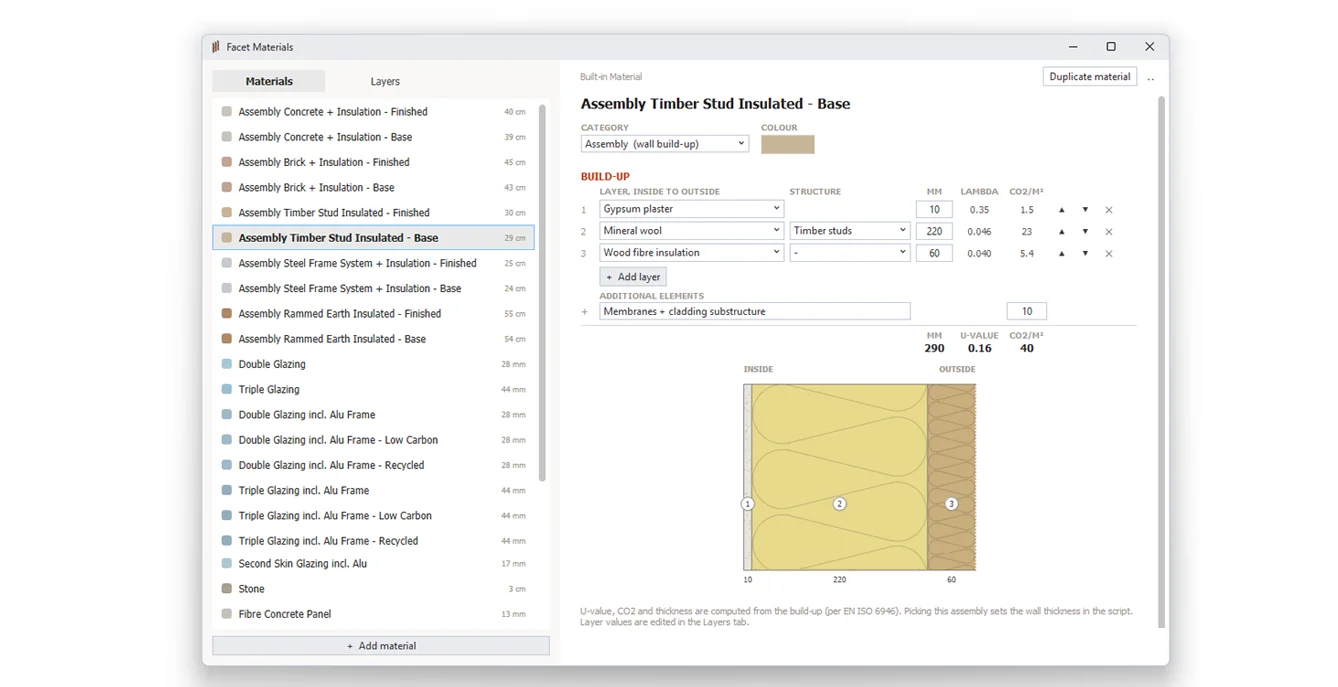
Adjust floor heights, spacing, and panel rhythm via Rhino UserText. Fine-tune with clearly labelled Grasshopper sliders. Bake onto preset, structured layers with materials pre-assigned.

Built for Real-World Workflows

Designed to work on the messy, imperfect geometry of early-stage designs.

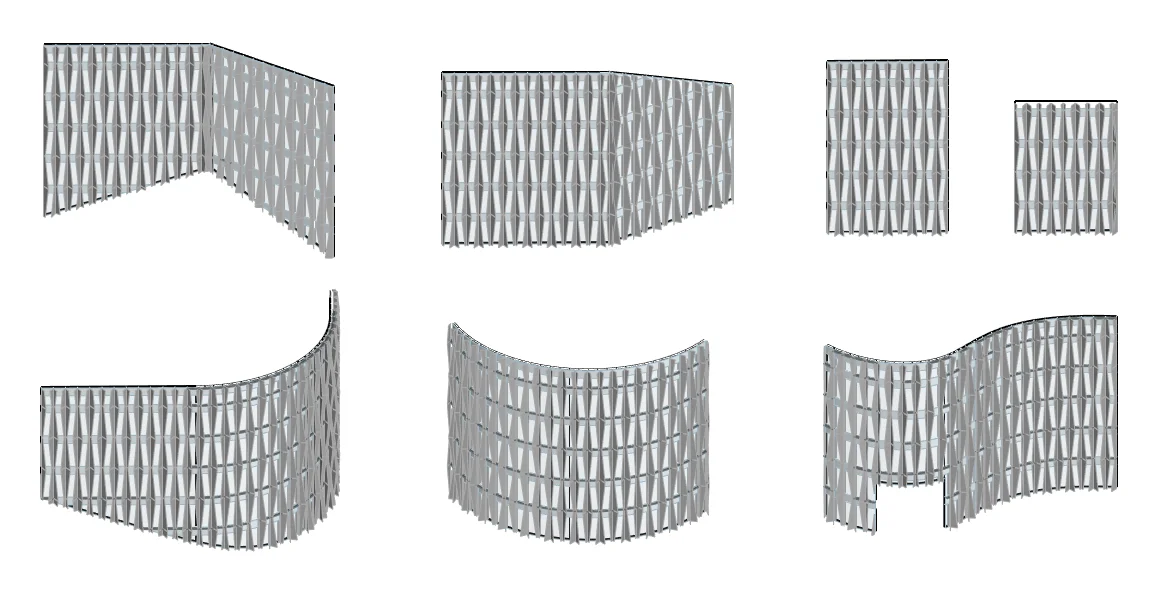
Turn any vertical surface into a facade

No complicated setups and definitions that break at the slightest change. The only input you need is a vertical Surfaceor Polysurface– facet will do the rest. Our professionally developed scripts work on:

  • Surfaces
  • Polysurfaces
  • Polysurfaces with trims and openings
  • Polygonal and curved facades
  • Single and multiple inputs

Intuitive parametric design

Full design control while facet does the heavy lifting.

Spend your hours iterating on design intent, not endless remodelling or fighting broken data trees. Facet handles the complex computational math silently in the background.

Control Facade Direction

Always be in control of where the facade points. Use the Rhino-native ‘Dir’ command to display the surfacve or polysurface normals so you know excactly which way the facade will be. Flip the direction with a simple click.

→ DIRECTLY IN RHINO 

Set custom floor heights

On real projects, floor heights aren’t uniform. Set custom dimensions for double-height ground lobbies, standard office levels, or special floors —all driven directly from the native Rhino Properties panel via UserText. No Grasshopper required.

→ DIRECTLY IN RHINO 

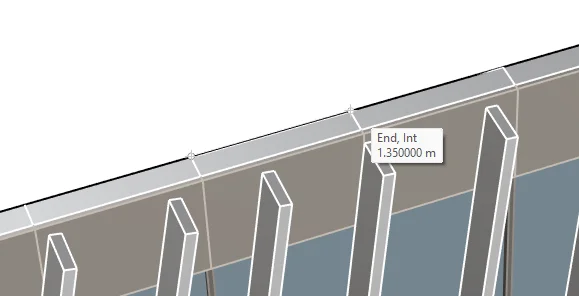
Custom Spacing Grid Notation

Customize global facade spacing in Grasshopper or create custom spacing parameters on a surface-level basis.


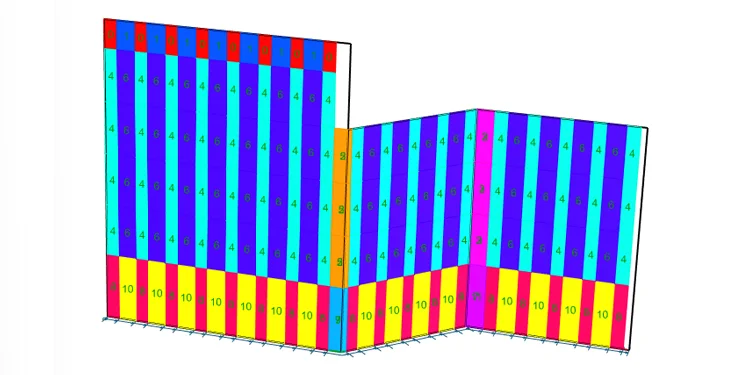
A Grid-ALginment widget will display the current spacing to make it easy to align with structureal grid or target lengths. The widget also displays the side from which the spacing is measured.
The direction can be flipped in the same Usertext properties (FlipDirection).

→ DIRECTLY IN RHINO 

Fine Tune & Customize

Floor to Floor Shift

Add horizontal elements

Add Fins at custom spacings

→ IN GRASSHOPPER

Control the Output Layers and Material

Floor to Floor Shift

Add horizontal elements

Add Fins at custom spacings

→ IN GRASSHOPPER

Not your average Spaghetti code

Facet scripts aren’t fragile, one-off prototypes—they are production-ready frameworks engineered for repeatable workflows. Built to be deployed across multiple projects, they deliver consistent geometry and integrate seamlessly into your studio’s pipeline.

Go as deep as you want.

Facet scales with your Grasshopper expertise.

Beginners

Design directly in Rhino. Use the property panel to shape the facade with Grasshopper running in the background. No GH knowledge required.

Intermediate

Open the Grasshopper canvas and fine-tune the clearly labeled blueparameters to customize the design even more.

Advanced

Use our highly organized logic as a foundation and add complex custom code on top.

The Workflow

Design the 10% that makes it iconic. Automate the 90% that doesn't.

Your firm doesn’t do off-the-shelf design. But rebuilding the exact same curtain wall logic from scratch for every competition pitch isn’t bespoke design—it’s repetitive labor. Facet gives you the ultimate starting line, so you can spend your hours designing where it actually counts.

01

Focus on the architecture, not the algorithm.

Facet handles the heavy computational logic—data trees, surface UVs, — so you can focus on the architectural expression. It is a foundation, not a straightjacket.

02

Fully editable scripts

Every script comes production-ready, but nothing is locked. Every parameter is fully exposed in Grasshopper. Dial in custom extrusion profiles, exact mullion depths, randomized panel distributions, and precise material tracking. 

03

Your IP. Your Geometry.

There are no watermarks, no locked clusters, and no licensing restrictions on the output. Use the scripts as a foundation for your final delivery models, client pitches, or as a springboard for your own custom Grasshopper development.

The Library

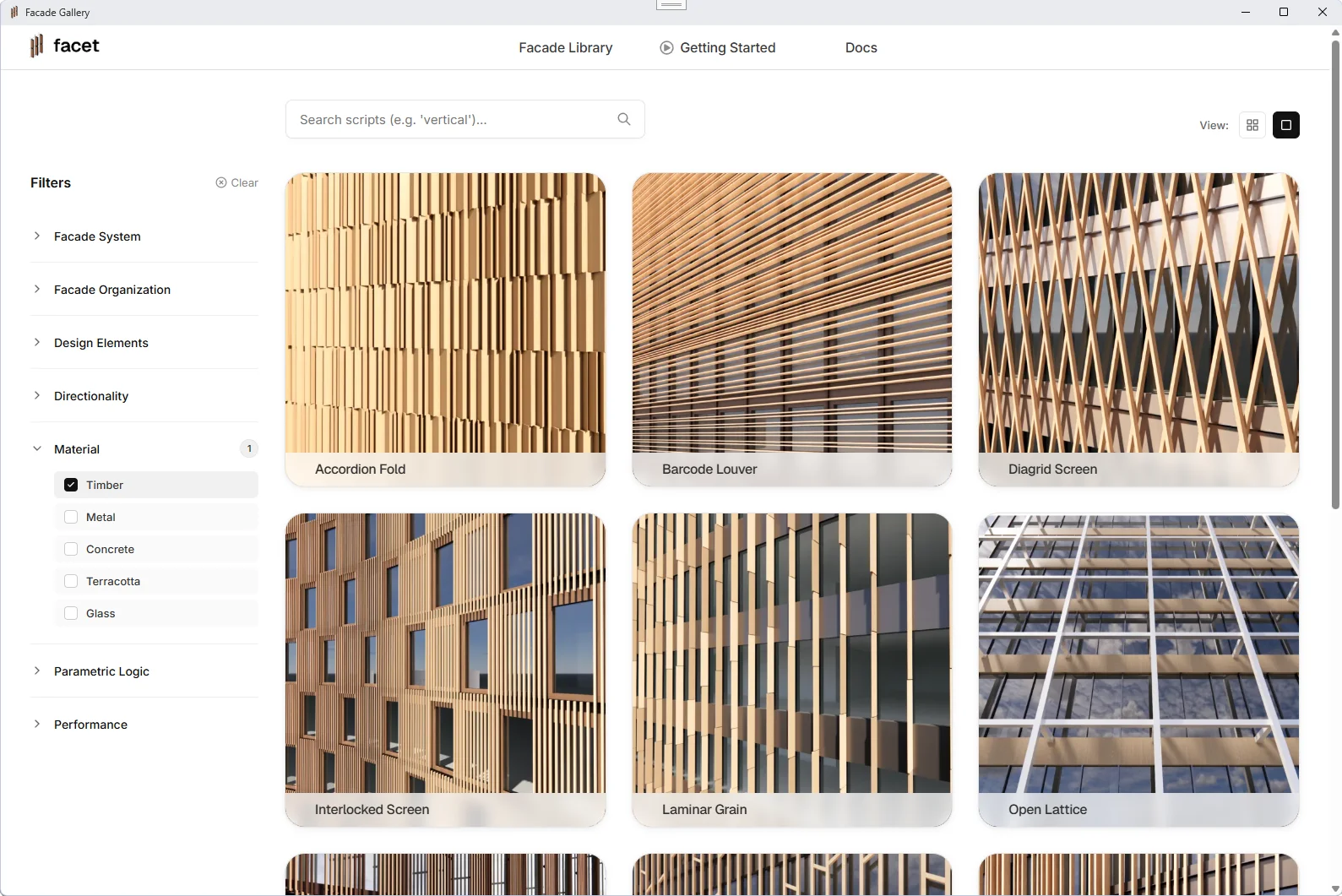
70+ scripts. Every facade typology.

Stop digging through a seven-year-old project folder for a broken script. Facet gives you a visual library with powerful filters — and new facade drops every month.

Fins Louvers Regular Grids Staggered Grids Screens Complex Panels Randomized

Your best Computational Designer may leave tomorrow. Facet remains your firm's asset.

Built for your studio’s design workflow

Facet scripts aren’t fragile, one-off prototypes—they are production-ready frameworks engineered for repeatable workflows. Built to be deployed across multiple projects, they deliver consistent geometry and integrate seamlessly into your firm’s pipeline.

We maintain the scripts so they always just work

Rhino and Grasshopper are constantly updating. We continuously test, maintain, and update every script in our library so a software update never costs you a deadline.

New facade frameworks added continuously

We add new, cutting-edge facade scripts based on industry trends and user requests. Your subscription gives you immediate access, ensuring your design palette is always growing and never stale.

Questions and Answers

What’s the difference between the Solo and Studio plans?

The primary difference is how the licenses are allocated and how your team can utilize them:

  • Solo (1 Dedicated Seat): This plan is node-locked to a single machine. It is designed for individual freelancers or solo consultants. The scripts will only compute on the specific computer registered to that account.

  • Studio (10 Concurrent Seats): This plan operates exactly like a Rhino Zoo network license pool. You can activate Facet on every single machine in your office and drop the files onto your shared network drive. The cloud server automatically manages access, allowing up to 10 architects in your firm to run the scripts concurrently at the exact same time.
    If all 10 seats are in use, an 11th person has to wait until a colleague closes their session.

Any geometry you have baked into your projects is yours permanently as clean Rhino geometry. However, to access the cloud library, download new frameworks, or to run scripts you have already downloaded, an active subscription is required.

Facet scripts require an active license to run. 

New facade scripts are added monthly. Reach out if you would like to see specific designs and they’ll be added to the roadmap.

Yes. All scripts run out-of-the-box with minimal setup.

Our 5-minute QuickStart guide gives first-time Grasshopper users all they need to know to start creating facades.

Absolutely. The definitions are fully editable like a normal Grasshopper script.

All scripts require one grasshopper plugin (Elefront). Installation guide included on first login.

Yes. Script outputs clean geometry you can push through Evolve, Rhino.Inside, or IFC round-trip.

Rhino 8

Dive straight into creative logic without the complex setup. The scripts are the solid base you can build on.

  • You get fully editable 3D geometry, not a flat JPG
  • One slider tweak gives infinite controlled variants—no prompt roulette
  • Clean NURBS bake straight into Rhino-Inside or IFC, ready for detailing

Any more questions? Reach out to:   thomas@facet3d.com

Parametric superpowers for your entire design team.

Spend your time making design decisions, not manually rebuilding 3D models. Start testing complex facade options in seconds.

NO GRASSHOPPER EXPERIENCE REQUIRED    ·   RHINO 8    ·   70+ SCRIPTS

Built for Real-World Workflows

Designed to work on the messy, imperfect geometry of early-stage designs.

Turn any vertical surface into a facade

No complicated setups and definitions that break at the slightest change. The only input you need is a vertical Surfaceor Polysurface– facet will do the rest. Our professionally developed scripts work on:

  • Surfaces
  • Polysurfaces
  • Polysurfaces with trims and openings
  • Polygonal Base Surfaces
  • Curved Base Surfaces

Supports Multiple Inputs

Easily apply the facade onto several input surfaces. Facet takes care of all the data branch management in the background so you can focus on designing.

Intuitively control your design directly in Rhino.

  • Assign custom properties like floorheights and spacing using Rhino UserText.
  • Use the surface direction to control which way the facade points.
  • Get live preview of element spacing so you can align the facade with the structural grid.

Not your average Spaghetti code

Facet scripts aren’t fragile, one-off prototypes—they are production-ready frameworks engineered for repeatable workflows. Built to be deployed across multiple projects, they deliver consistent geometry and integrate seamlessly into your studio’s pipeline.

Go as deep as you want.

Facet scales with your expertise.

Beginners

Generate facades using the default 3-step setup. Adjust floor heights, spacing and the main design-specific parameters. No GH knowledge required.

Intermediate

Tweak the details without breaking the code. Key areas like fin profiles and panel rhythms are isolated in clearly marked “Design Zones.”

Advanced

Open the hood. Use our highly organized logic as a foundation to build your own custom parametric networks on top.

Go as deep as you want.

Facet scales with your expertise.

  • Beginners: Generate complex geometry instantly using the default 3-step setup. No GH knowledge required.

  • Intermediate: Tweak the details without breaking the code. Key areas like fin profiles and panel rhythms are isolated in clearly marked “Design Zones.”

  • Advanced: Open the hood. Use our highly organized logic as a foundation to build your own custom parametric networks on top.

The Problem

Facade iterations are the slowest workflow — and the biggest cost in early design phases.

01

Modelling facade options is the slowest part of early design phases

Facades are the most complex part of architectural design. Manually populating hundreds of mullions, panels and fins takes hours for a single facade study. Multiply that across five competition options and you’ve spent a week on geometry alone.

02

Even small facade changes often cause time-intensive remodelling.

And early design phases are all about change. Floor height changed. Opening moved. Brief updated. With manual models, every change means hours of rework — for geometry that should update in seconds.

03

One Grasshopper designer is a bottleneck — and a single point of failure

Every facade request flows through the one person who knows Grasshopper. When they’re busy, the team waits. When they leave, the scripts go with them.

800 h

average hours spent on concept design per project — with the majority wasted on repetitive modelling, not actual design decisions.