Facet is a plug-in for Rhino 8 on Windows. You install it through Rhino’s Package Manager, then start a free trial or enter your licence key.
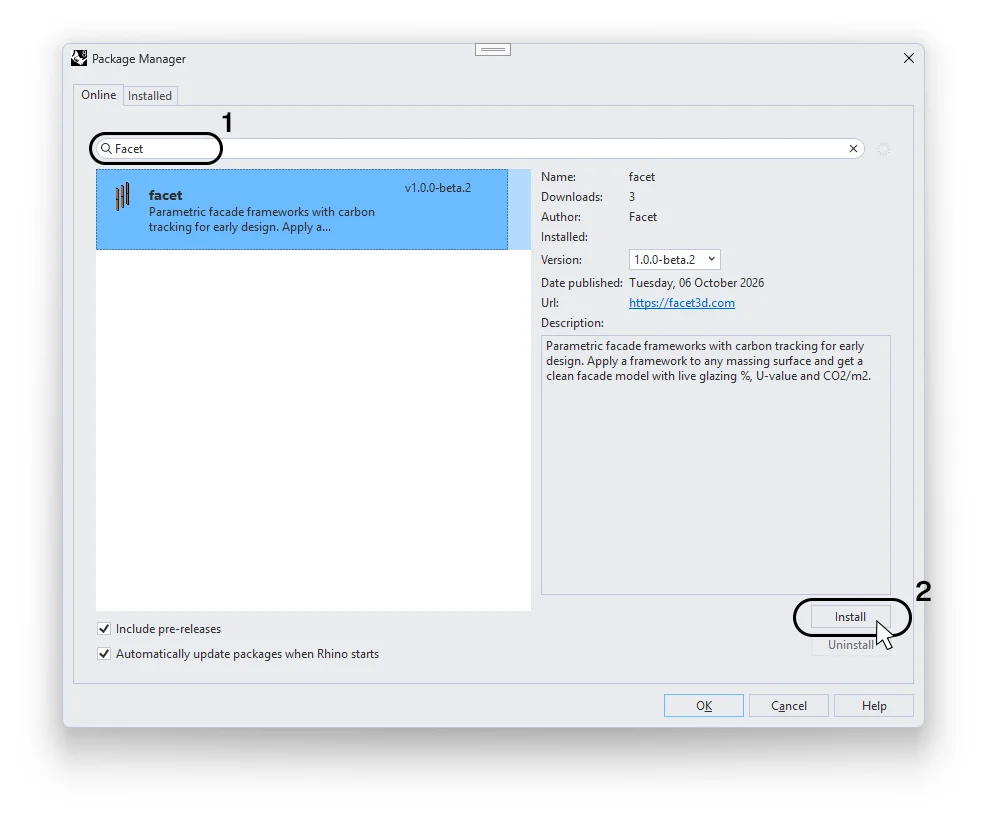
1. Install from the Package Manager
- Click Open in Rhino. Your browser asks to open Rhino — allow it, and the Package Manager opens with Facet already in the search.
- Select Facet and click Install.
- Restart Rhino.
Button not working? In Rhino, type PackageManager, search for facet3d and click Install.
2. Open Facet
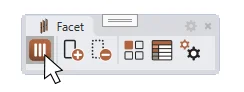
After the restart the Facet toolbar appears. Click the first button (the Facet icon), or type Facet in the command line. The Facet controller opens.
Don’t see the toolbar? Typing Facet also brings it back.
3. Activate
Click Select Framework to open the gallery. The first time you do, Facet asks for a licence. Choose the option that fits you:
| Your situation | What to do |
|---|---|
| New to Facet | Click Start free trial. Enter your email, then the 6-digit code we send you. Your 14-day trial starts straight away — everything included, no card needed. |
| Your office has a licence | Click Enter license key and paste the key from your office’s licence email. Everyone in the office uses the same key. |
| Switching from a trial to a licence | Open Facet Settings → License → Enter Different Key… and paste your key. Your work isn’t affected. |
Uninstalling Facet
Open PackageManager, find Facet under Installed, click Uninstall and restart Rhino. Anything you’ve baked stays in your Rhino files.
Network requirements
Facet checks its licence with api.keygen.sh and loads frameworks from facet3d.com. If your office network blocks either, ask IT to allow both.
Still stuck? See Troubleshooting or write to support@facet3d.com.